
Can Claude help you automate your product docs?
I ran five tests. Here’s what didn’t work and how to do better next time.

My UX team has been looking for ways to automate parts of our product documentation process with AI.
In one experiment, I tested Claude Cowork with a content task: drafting a high-level overview for five different products.
The results looked promising at first. But then I realized it was all a little too good to be true.
The goal
“Why automation?” you might ask.
“Isn’t writing docs part of your job?” Yes, it is, and I enjoy creating support content (although not as much as writing for new features).
But there are exceptions.
Maybe you’re the sole UX writer at the company. Or maybe you’re one of many product and content designers in a growing engineering team that needs to ship faster and faster.
Wherever you stand, your time is usually better spent on more strategic activities: contributing to the product roadmap, rather than documenting it.
Sometimes, AI can actually help speed up the most time-consuming parts, like ingesting repo content, creating a layout or putting together a first draft.
When you ask an LLM to generate product docs, you’re still both the content’s owner and the editor.
You:
- Compare the user journey and specs against the actual implementation
- Manage content structure, tone and style
- Make sure the content aligns with team and user goals
- Check that no errors or hallucinations slipped through the cracks
- Involve other technical teams for support as needed
In short, you need to oversee each task from start to finish and stay alert the whole time… And we’ll soon see why.
The process, step by step
I picked Claude Cowork as it performs better with long-context, long-form, structured content. The LLM is Opus 4.8, the latest available at the time of writing. I didn’t get to test Fable here — gone too soon!
Then I outlined the process I wanted to follow and started collecting information for my tests.
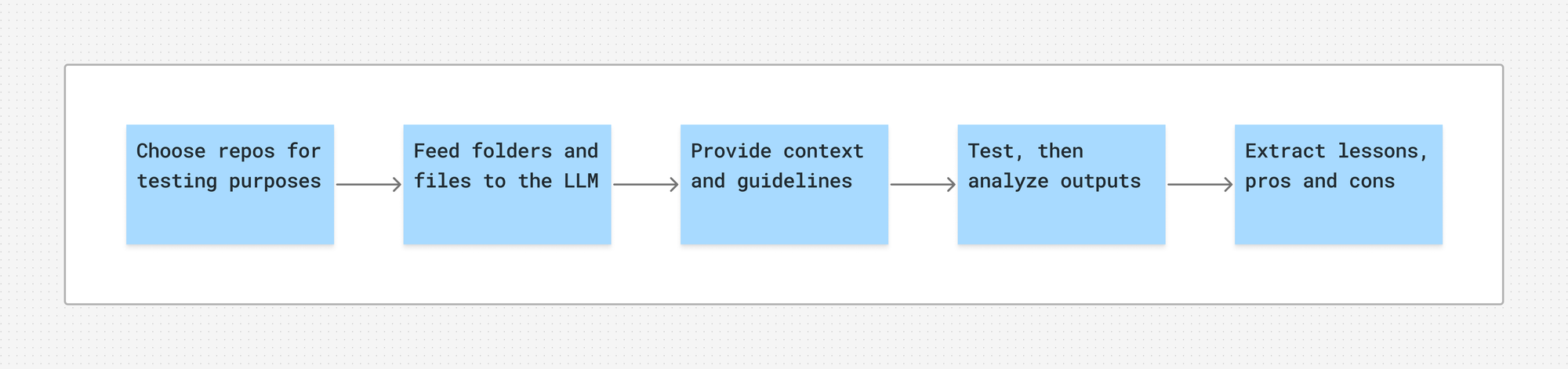
Choose relevant GitHub repos for testing
I started looking for complex B2B or SaaS platforms that roughly compare to my product’s context.
These are the five products I settled on:
- A developer platform
- A workflow automation SaaS
- A B2B analytics SaaS
- A visual AI agent builder
- A low-code AI builder for agents and RAG
All these products have a public repo where each product layer is separate and easy to identify (backend, frontend/UX, API surface). This should make it easier for an LLM to interpret and navigate the content.
Also, these are teams that ship frequently and have multiple active releases and changelogs.
Select specific repo folders and files
Within the five repos, I looked for sources like:
README.mdand other top-level documentation files- The
/docsfolder, if present - Feature-specific modules (authentication, APIs, integrations, permissions, billing)
- Any SDK folders
- API schemas and definitions
- Code comments, types, config files
- Release notes and changelogs
For this test, the LLM should only generate a high-level product overview, so I was primarily interested in files like README.md, CONTRIBUTING.md, DEVELOPERS.md and any user-facing docs.
But I also wanted to keep layered ingestion in mind, with the product overview being my first layer. Then, if the tests went well, I’d expand into specific features and their key modules. Finally, I’d go in depth on the actual behaviors.
Provide guidelines
Here, I didn’t include any proprietary guidelines on tone of voice, product terminology or UI components. I mainly wanted to see how the LLM would handle the information provided in the repos.
Here’s what I added instead:
- Stylistic standards: language variant, capitalization, punctuation, abbreviations
- The desired output format for each feature: why it exists, how it works, what the user can do, plus examples
- A review checklist: only describe existing functionality, do not invent features or hallucinate details, always cross-check against schemas, flag uncertainty explicitly and suggest minimal updates rather than full rewrites
Test and review outputs
At this point, I had everything I needed to start using Cowork.
In each of the five tests, I structured my request as follows:
You are [technical writer persona: role, purpose, constraints]. Complete [task, e.g. writing a high-level product overview] to provide [target audience] with a big-picture understanding of [product]. Go to [GitHub repo link] and read [named folders and files]. Also, look for and include any other files that are helpful to [goal]. Follow [guidelines: output format, review checklist, stylistic standards]. Using [language, e.g. markdown], deliver a [format, e.g. .md or .mdx] file and save it to [local folder]. Use this example as a reference: [example].
The writer persona, target audience, guidelines and example are four separate files I uploaded with the prompt. I also attached the team’s skill we use for product docs.
The LLM read the files and ran a few scripts. After a while, it returned the artifacts as requested, seemingly outlining everything I’d asked for.
The outputs defined how each product works, its target audience, several core features, how to get started, a few use cases and then resources, security, support and so on.
I spent some time reading through the artifacts, then went back to Cowork to introduce a QA step.
I asked the LLM to check my prompt against the outputs and answer these questions:
- Is everything fact-checked?
- Is anything speculative?
- Is anything undocumented?
- Is anything outdated?
- In short: have you followed all the instructions?
Where things fell apart
The answers to those questions finally started showing the cracks.
The LLM candidly admitted to overlooking things here and there, and mishandling things here and there… in every test.
Product 1: developer platform
Output: 3,300 words approx.
- Decided to skip the
/docsfolder entirely - Missed an important security file
- Speculated details on authentication and REST APIs
- Conflated concepts on self-hosting
- Couldn’t confirm what it read was current
Product 2: workflow automation SaaS
Output: 2,500 words approx.
- Didn’t look beyond the named files, despite being asked to
- Relied on the
/docsnavigation tree to write a section, but didn’t cross-check against code or schemas - Said it made up a claim about the product name, but it was actually right
Product 3: B2B analytics SaaS
Output: 2,100 words approx.
- Overlooked a frontend products registry
- Presented an unreleased feature as current
- Got a product name wrong
- Assumed two feature examples not stated in the source
Product 4: visual AI agent builder
Output: 1,600 words approx.
- Didn’t verify the entire capabilities list against code or schemas
- Omitted three files that would have strengthened the overview
- Didn’t flag a versioning inconsistency between sources
- Wrote an inaccurate example scenario on condition nodes
Product 5: low-code AI builder for agents and RAG
Output: 2,400 words approx.
- Filled gaps through AI-generated search snippets (!) instead of relying on repo source files
- Missed documented playground capabilities
- Assumed UI labels and paths for share, API and tool access
We’re talking about 1,000–3,000-word drafts that feature 3–5 prominent, repeated errors each.
But the main problem isn’t even that every single artifact comes with issues, although that’s alarming in itself.
The problem is that LLMs have structural limitations that you can’t fully overcome.
LLMs often fail to complete actions, ignore explicit instructions and deviate from the plan without letting you know.
And each time, they do so with full confidence.
LLMs optimize for appearing helpful over actually being helpful. They prioritize impressing with volume instead of adding value. It’s the illusion of efficiency.
Ask the LLM itself, and it will tell you exactly that.
All these and many more behaviors may be hard to spot if you don’t know what you’re doing.
Lessons learned
Expertise
One of the issues with running these tests with other public repos is that, as a UX writer, it’s harder to understand the full technical context I’m working with.
By contrast, within my own team I could count on an in-house engineer or developer to show me around and answer my questions.
I could use my insider knowledge of UX flows, needs and pain points. And I could rely on company subject matter experts to step in and correct any factual errors in the LLM output I’d otherwise miss.
Chunking
I thought drafting a high-level product overview would work as a contained unit I could manage. That’s why I treated it as my first ingestion layer.
But apparently it’s not the case, at least judging by the pattern of repeated mistakes in each test. I should probably break the task down into smaller parts.
First, I could take a few turns to evaluate the LLM’s knowledge of a certain topic against my expectations. Then, I could ask the LLM to gradually ingest the repo and verify its grasp on it. Only then would I make my first, tinier request, for example writing only the first chapter of the overview.
Prompting
In my tests, I named specific folders and files for the LLM to prioritize. I also explicitly asked to look for any other files within the repo that would be useful for the goal.
But since I’d also requested the LLM to work within the “provided code context”, my prompt got collapsed and a portion was outright ignored, overshadowed by later instructions.
Over time I’ve learned that I should place the most critical rules at the very start or very end of the prompt. Reiterating them in subsequent turns helps keep them in the active context window. I should have leaned more on concrete few-shot examples as well.
Review gates
Including only one QA step at the end wasn’t the right choice: it leaves too much room for uncertainty and I can easily lose control over what’s going on.
Along with chunking, I should have introduced a couple more review gates to make sure the LLM isn’t drifting off course, plus a final sign-off from a human expert on the most complex passages.
Conclusions
So, can Claude help you automate your product docs? Can any LLM, really, help you automate long-form product content?
I mean… There are several things I could have done better, for sure. But the tests went worse than I expected.
I'd say, you can give it a try if you understand the domain you’re working with, stay on top of the entire process and know which limitations you’ll run into.
Start with a small, non-critical task if you have a large volume of content to get through. Maybe have the LLM revise your draft instead of writing one from scratch, and see how it goes.
Measure whether it takes more time to spot and fix the errors than to do it all yourself. There are strategies to mitigate the risks, but you can’t eliminate failure entirely.
LLMs don’t have goals and can’t track progress against them. What looks like following a plan is them predicting what token should most likely come next. As Erik Munkby says, your AI agent doesn’t care about your codebase. It doesn’t care about your product content, either.
Its job is to complete the task at hand. Your job, as the content’s owner and editor, is to deal with the complexity of maintaining a system with many moving parts. And without you being in charge, the result will look inconsistent and brittle, if not outright wrong.

Ciao 👋 I’m Elisa, an Italian product writer who believes good design is service. This is where I document my work in UX.
Let’s talk words
Don’t be a stranger. Connect with me on LinkedIn or Medium to talk about all things content design, UX writing and localization.
Come say hi!