
Repurpose your UX content assets with AI
The internal doc you built for one approval meeting can have a second life, and you get to own the process.


I’ve been working on a new, complex B2B flow with a senior product designer. It’s an entirely new product layer with its own dedicated role.
After we finished the first version, I packaged a UX proposal that describes what users get from the feature step by step. This doc includes the flowcharts, designs, links and explanations a technical stakeholder needs from UX to get the conversation going.
It’s an important resource for us on the UX team, because it gets shared quite a bit across engineering and delivery teams. People use it to clarify behaviors, comment on requirements and agree on what we’ll be doing next.
But it’s a pity for this type of asset to sink into obscurity after we approve the flow. So I thought I’d do a little content repurposing experiment to try and extend its lifecycle.
In particular, I wanted to use this UX proposal as a starting point and instruct Claude to derive different types of content from it. Here’s how it went.
Who needs this
There are a few writer profiles who can benefit from this AI-enhanced approach. For example, it makes sense if you’re a UX writing freelancer or contractor managing multiple clients at once.
The same goes if you’re the sole UX writer at the company, or one of very few writers in a growing engineering team.
In general, this applies whenever the writer-to-designer ratio is off balance, meaning you divide your time among several designers and developers.
Staffing and ratios aside, this may be for you if you want to position yourself as the go-to content person on your team. You not only deliver product content, but also create the tools and frameworks that help other writers (or non-writers!) do their job a little better.
How I did it
To start with, I selected the three types of assets I find the most reusable based on my current work.
- A UX proposal template
- A Claude skill
- A multilingual taxonomy
The template
We’ve been writing a few UX proposals lately, but we hadn’t created an abstraction yet. This document has a strong repeatable structure, so it’s time to standardize it to make future proposals more consistent and easier to draft.
I asked Claude to analyze two of our most recent proposals and extract common patterns. I compared the results, chose the most relevant sections and asked Claude to rearrange and clean up the layout. I got back a markdown artifact that we can import or duplicate as a Confluence page.
- Title: {Feature name} v{n} | {Asset type}
- Links: user journey, roadmap, Figma designs
- Intro: goal + scope, 1–2 sentences
- Flow: list of capabilities framed by role + flowcharts (As a {role}, you can…)
- Walkthrough: entry point, task sections and sub-action grouping, with explanations and captioned screenshots
- Edge cases and error handling
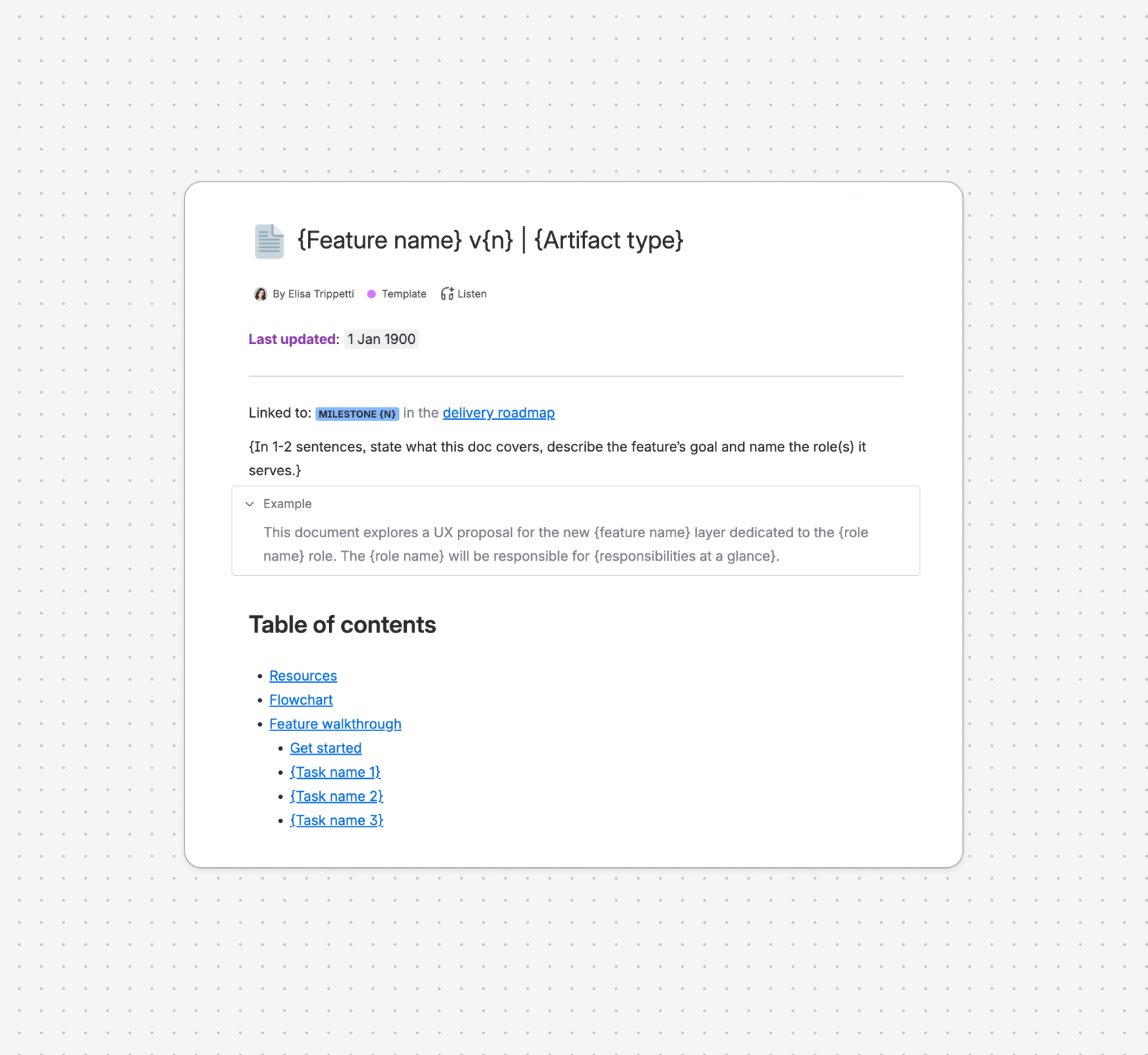
I read the output and started doing my refinements. As I went through the doc, I adjusted the language and style to sound like us, and added realistic examples for each section.
I also noticed that Claude had included an “Authoring notes” section at the bottom of the page with guidelines on how to use voice and tense, terminology, cross-references and placeholders. These instructions don’t belong in a feature-specific UX proposal, so I asked Claude to remove them from the template but set them aside for our next asset.
The skill
A template controls the form, but what about the substance? On our team, both writers and designers draft UX proposals. We roughly know what we want to capture, but we may get stuck along the way or miss something important.
So I thought a Claude skill would fit here.
I like building skills because they’re a great way to practice product writing to address a real problem. You get to test them right away and measure how close you can get to the desired result. If you find any gaps, you can easily course-correct and create your own list of best practices.
For this particular skill, it was natural to bundle the newly created template with the reference proposals above. I also wanted internal users to experience it as a Q&A session, where the skill itself nudges you in the right direction and helps you populate the template.
When the skill is invoked or mentioned, Claude should act as follows:
- Analyze the user input and select the portions that are relevant to the template.
- If nothing in the user input can be used to flesh out the proposal, start asking follow-up questions: feature name, version, product roles involved, scope, main tasks, links and so on.
- Ask the user if they’d like to include visuals at this stage. If they don’t, offer to write a caption placeholder that summarizes each task.
- Once you have everything you need, share a recap with the user and get their approval on the content before moving forward.
- Apply the authoring rules on voice, grouping, captions, terminology.
- Package the proposal following the structure and layout in the template and deliver it as a .md file.
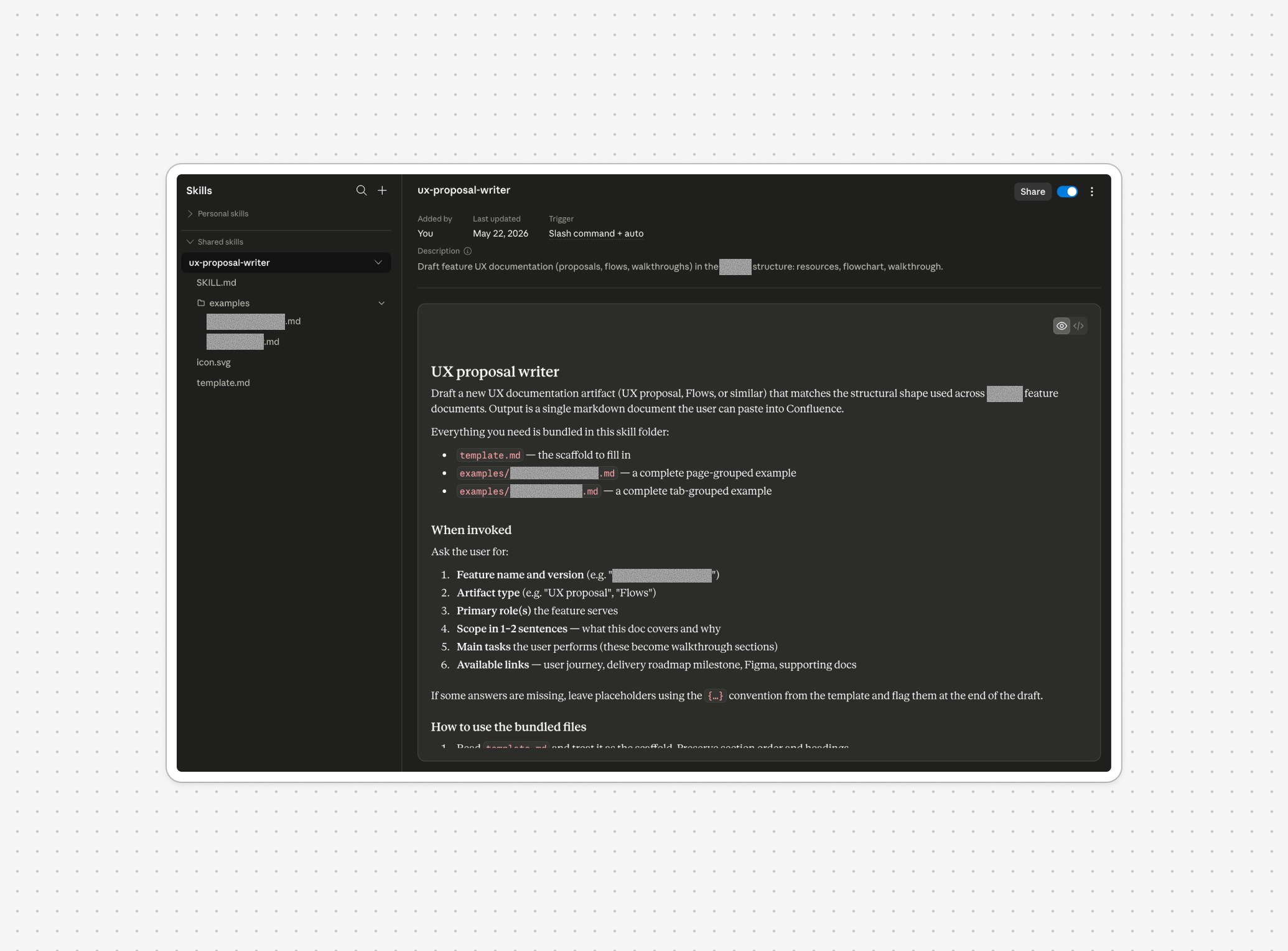
A functional skill is portable, autonomous and self-contained. It should work with the context all target users can access and understand.
Claude isn’t very good at this on the first try: it will often point to other assets mentioned earlier in the conversation. But those aren’t bundled in the skill, so the reader wouldn’t know what Claude is talking about.
I removed any out-of-place references to:
- Documents I considered using, but which eventually didn’t make it
- Assumptions and conclusions from the conversation
- Attachments like Figma embeds or pasted images
- External icon libraries (Claude kept bringing them up now and then)
The taxonomy
Our third asset is localization-specific. We can use it as a terminology source of truth, attach it as context in future agent sessions and also share it with delivery teams so they know how to introduce the feature to customers.
I asked Claude to study a taxonomy spreadsheet template created by information architect Delfina Hoxha.
This is a very useful blueprint because it covers pretty much all the columns we need to get started localizing the feature: terms, definitions, status, usage, product area, part of speech, ownership and translations.
 Delfina Hoxha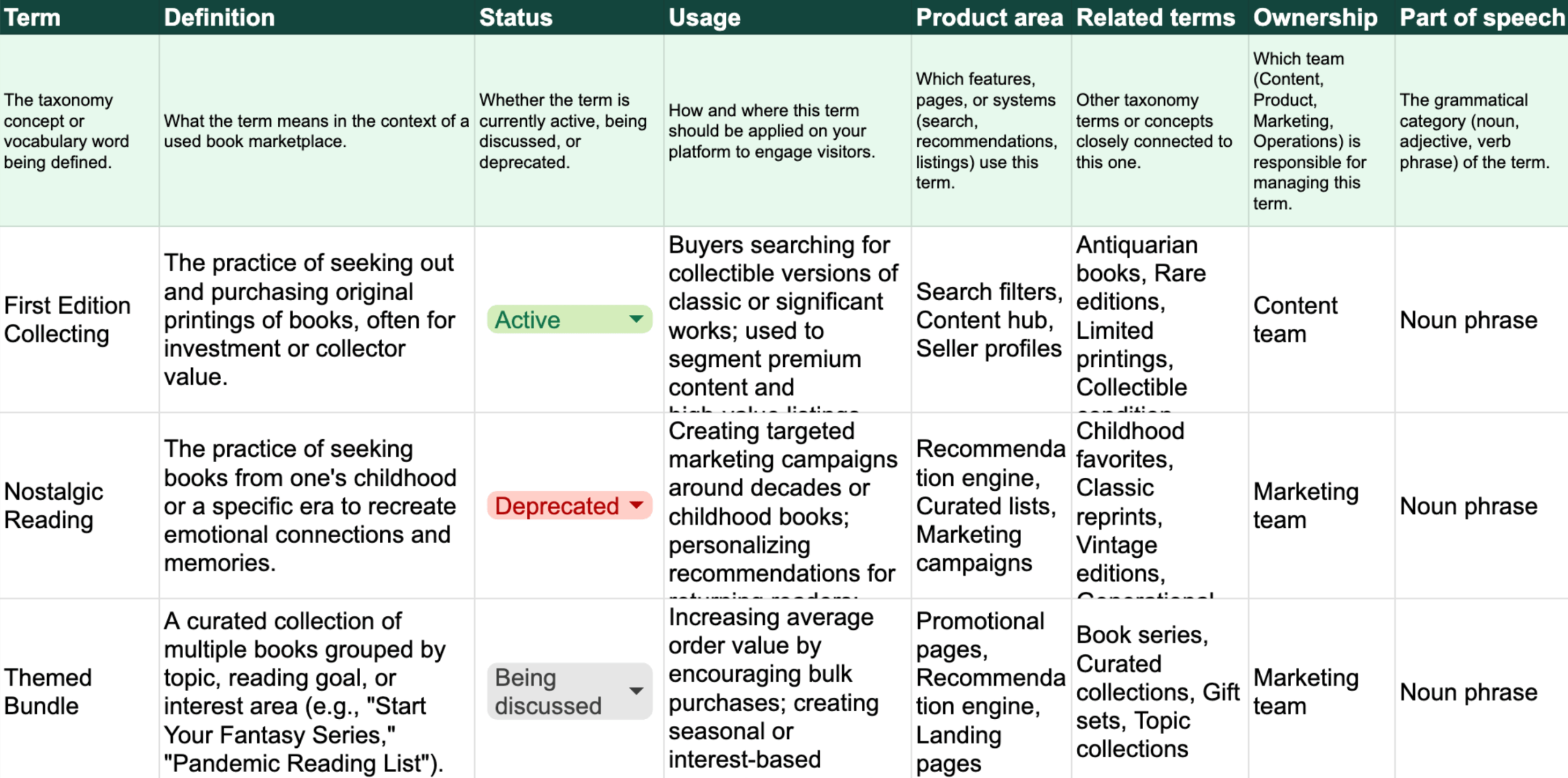
The taxonomy template by Delfina Hoxha
After that, I had Claude review my original UX proposal. My intention was to fill out the spreadsheet using my feature-specific walkthrough.
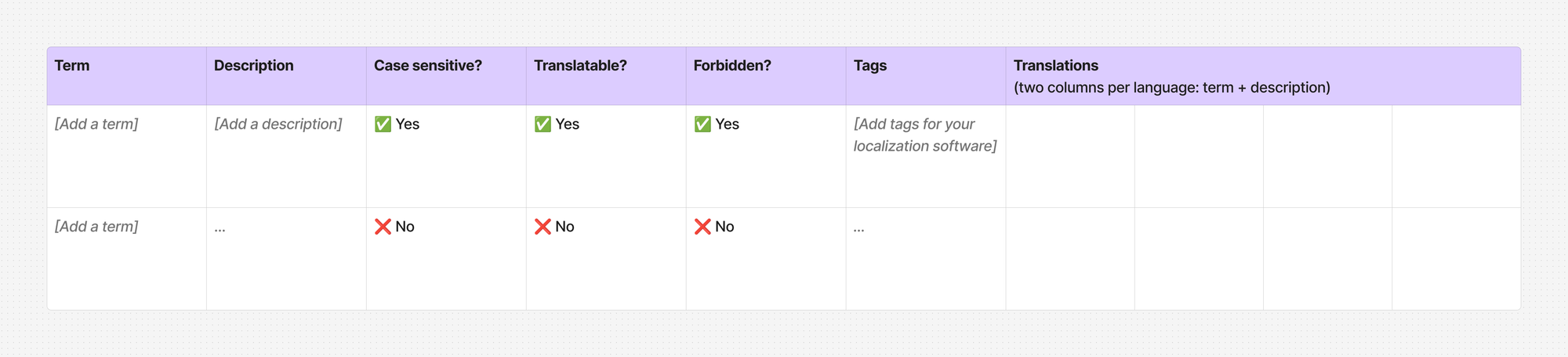
I then realized this would work a lot better if I also uploaded a multilingual glossary with confirmed terms and translations. Claude would compare and merge the concepts extracted from each asset to improve accuracy, then localize them into 4 UI languages.
While reviewing the output, I noticed a term collision, meaning that two distinct product concepts would share the same word. This is a point that should definitely be discussed with other stakeholders, so I instructed Claude to reflect the conflict more explicitly in the status, usage and product area columns.
What else I can do
These are just three ideas I spun up from one source asset. Here are more reuse examples:
- A user-facing help center article (or individual modules to spread across articles). I’d pair this up with the multilingual taxonomy
- A changelog
- Release notes
- A testing checklist for the QA team that covers tasks, expected behaviors, edge cases and errors
- A script for new onboarding emails
- A one-pager for business stakeholders, trimmed down to the feature’s goal, scope and main capabilities
When this works
You always need to make sure all parties involved are on board with you using AI with their proprietary information.
Yes, I know AI mandates and tokenmaxxing are a thing (and we’ll see how long this can last). But I’ve come across creative agencies, publishers and consulting firms that are never OK with their customer data being fed to an LLM.
Also: the task needs to have a clear purpose. Just like with good old non-AI writing, you understand your goal, the target audience and the use case very well.
There’s no point in blindly increasing output if the deliverables don’t fit any real scenario. If the assets you provide are too generic or off-topic, they can’t help others do anything productive.
And one more thing: try AI repurposing if your role gives you room to own the production process end-to-end. Ideally, when you’re done iterating you should be able to monitor who can access the assets, how they’re used and what impact they have.
This is step one: repurposing the content.
But did we reuse the template, invoke the skill, share the taxonomy?
I’ll talk about how the assets are put to work in an upcoming post.

I’m Elisa, a product writer who believes good design is service. This is where I document my life in UX.
Let’s talk words
Don’t be a stranger. Connect with me on LinkedIn or Medium to talk about all things content design, UX writing and localization.
Come say hi!