
Sustainable context switching for busy UX writers
Notes from a content person who multitasks and decided to do something about it.


You've just started writing for a new flow. The flow is a small addition to an existing feature, but you need to tweak it for desktop, iOS and Android. You're working from a short brief and you just know there'll be a lot of questions.
At the same time, there's another big, bad feature looming. This one has a long, detailed user journey for you to digest. The designer has started drafting flowcharts, and you've already spotted a few places that will require a lot of terminology research.
And that's not all.
You've been off for a day and you already have a backlog. Frontend is looking for localization support, while QA raised a couple of scenarios nobody had thought of. You have to come up with quick (yet solid) fixes on the go.
As you do that, you're also making an effort to keep multiple threads together: creating artifacts and content assets for yourself, other writers and non-writers, and making sure the output stays consistent across the product.
All the while, your company and the industry at large are nudging you to pivot, ever so steadily, into a more technical version of yourself.
I may have just described a normal day at your UX writing job. And I feel this is increasingly the reality for many of us.
More often than not, my default anxiety mode kicks in and I start pushing through by working faster. But I know this almost certainly leads to the opposite effect: it takes me more time to finish the thing. It also exposes me to more mistakes and leaves me depleted by the end of the day.
So how do you manage all this?
There are a few behaviors you can put in place to make your life less stressful during the heavier days (like when you're approaching a deadline). Here are the accommodations that work for me.
Understand when switching works for you
I assume most knowledge workers would rather avoid context switching as much as they can, although that's not always possible.
You need to factor in that at some point you'll get distracted, lose the context you built up and then spend time recovering information before you can make your first move on the original task again. The effort to reorient yourself only leads to more stress and frustration.
And there are more variables that can come into play.
Context switching comes at a higher cognitive cost for neurodivergent writers and people with disabilities. Maybe you work in a busy office where coworkers stop by your desk all the time. Maybe you work from home while caring for young kids or an elderly parent.
Because of what life throws at you on any given day, it doesn't look like we can choose to avoid context switching altogether.
Whatever the case, finding workspaces and practices that consistently work for you can be even harder than usual.
I'm a content person with long-standing attention problems and a tendency to multitask. In my experience, I've found that it's kind of manageable with small, low-effort tasks and quick fixes in flows you've been following from the very start.
It doesn't work well with deep writing sessions, complex sequences of steps you're learning, new-feature onboarding and high-stakes, high-visibility flows that need all your attention.
That said, there's some wiggle room, and that's where we'll make our adjustments.
Listen for cues
You never know when an interruption is going to pull you away, but you can start to pick up the signals around you.
Context switches are easier to anticipate if you observe how your workday usually develops. For example, they tend to increase or decrease based on where you are in the release cycle.
Here's when interruptions happen the most for me:
- Customer-facing stakeholders share new customer needs and UX starts to flesh out user journeys
- UX submits a proposal to engineering leads and feedback starts to trickle in
- UX hands off a new flow to frontend, and both teams need frequent check-ins and follow-ups
- A new feature goes into integration or testing, and UX supports developers and the QA team
And here's when I experience fewer distractions:
- Early in the morning and up to the first standup meeting
- Right before and right after lunchtime
- Late in the afternoon (unless we're approaching a release)
I try to plan around these windows accordingly. For example, I batch routine tasks that don't require a lot of effort in the slots where I expect the most disruptions, and I spend more time on research, audits and drafts when things are naturally quiet.
I don't treat this as formal time-blocking, though, since the workday is fluid and I want to stay flexible.
Manage interruptions
Since I can't avoid switching altogether and can't know exactly when the next disruption will happen, I try to make adjustments upfront. They mostly apply to long-running projects and big, complex flows, but you can test them with smaller branching tasks too.
Here's what I do:
- During the day — Keep a decision log
- Before the interruption — Write a handoff note
- After the interruption — Resume with a routine
Let's see what each step is about.
Keep a decision log
Not long ago I realized I'd fallen into the bad habit of not keeping track of my decisions during early exploration work.
For example, when collecting screens to kick off a competitor audit, I wasn't always writing down which product the screen was taken from, which flow it was part of or what worked and what didn't. So I ended up with a bunch of out-of-context screens in a FigJam file.
When brainstorming alternatives for a component or working through a first copy draft for a new user flow, I wasn't documenting the rationale behind my choices. This meant that if I got distracted and then switched back to the task, I had to reconstruct my process from memory.
I found myself wasting precious time just to remember why I'd crossed a certain item off my list.
A simple decision log you update as you go can help. You can structure it as a brief or a table where you note down regular checkpoints.
Here's a template you can adapt to your needs:
- Date
- Project or flow
- Decision
- Options considered
- Rationale
- Technical owner
- Follow-up

This approach is also useful when drafting internal documentation, preparing Q&A sessions or simply retracing what you did on any given day.
Also, if you're out of office and another UX writer picks up your work, they'll definitely find it easier to understand what's been done before they step in.
Write a handoff note
Decision logs are good for organizing your day effectively and preparing for interruptions upfront. Handoff notes come into play when the interruption itself happens, or when you recognize potential warning signals.
Realistic handoff notes are quick and to the point. I usually write down the open question I'm working on and the exact place to restart.
The first point reduces my resumption lag; the second helps me locate the precise sentence where I left off among half a dozen Confluence pages and Figma tabs.
Here are some examples:
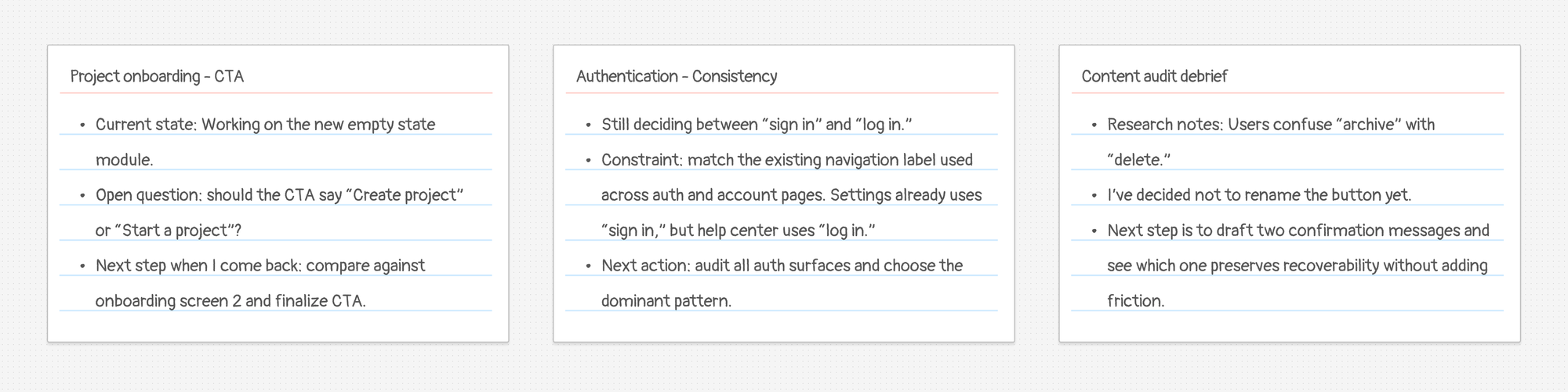
You may not always have the luxury of a pre-switch window to write down your handoff note ("Hey, let me just wrap this up and I'll be with you in 5 minutes"). If you do, give it a try; I think it does reduce the time you'll need to get back on track afterward.
And if you don't, there's your fallback already in place: the decision log.
Resume with a routine
At this point, the thing that distracted you is taken care of; you've left the interruption behind and you're now ready to switch back to the original task.
How do you collect your thoughts? How do you make restarting cheaper?
Define a re-entry checklist that works for you. If you've prepared upfront, you'll notice that it's easier to piece everything back together.
Scan the last handoff note and check if it answers these questions:
- Where was I exactly?
- What constraints am I working with?
- What am I supposed to do next?
If you feel you have what you need, you can resume. If the handoff note isn't fully clear, or you didn't have the time to write one, re-read the last few entries in the decision log for additional context.
I know this last part may sound a bit too obvious if you don't generally experience attention problems or restlessness, but some of us definitely benefit from fixed little rituals as we try to make multitasking more tolerable.
These were the least-annoying techniques I've been testing to manage interruptions and context switching.
Sure, I haven't yet mastered every single step every single time. Some sprints are crazier than others and throw me off track. Some days, especially if I'm getting back after time off, I'm all over the place.
But I'm getting there.
I can definitely see how creating a system around my needs and shortcomings alleviates some of the stress. You can give it a try: adjust it based on how you function and how your workday looks.
I'd love to know how it goes for you.

I’m Elisa, a product writer who believes good design is service. This is where I document my life in UX.
Let’s talk words
Don't be a stranger. Get in touch on LinkedIn or Medium to talk about all things content design, UX writing and localization.
Come say hi!